For my final project at Flatiron school I decided to build one of one of my all time favorite board games — Scrabble. I didn’t realise how complicated this whole affair would turn out to be. So here is a brief description of what I did to make it come to life.
Rails API I started with creating a Rails API app with four models: Game, User, Turn, and GamePlayer.
Each Game is initialised with:
- a board that is represented as an array of arrays of hashes to simulate rows and columns, as well as create a system of x and y coordinates for tiles to be placed to
- game tiles represented as an array of hashes
- “bag” that holds IDs of yet unused in the game tiles
The join GamePlayer table contains user_id, game_id, rack (user’s current tiles, represented as an array of tile ids), player_number, and score as well as turns through a has_many association with Turn model.
Turn model in its own turn (haha) holds a record of each turn taken including new word(s) that were formed and the amount of points earned.
React App
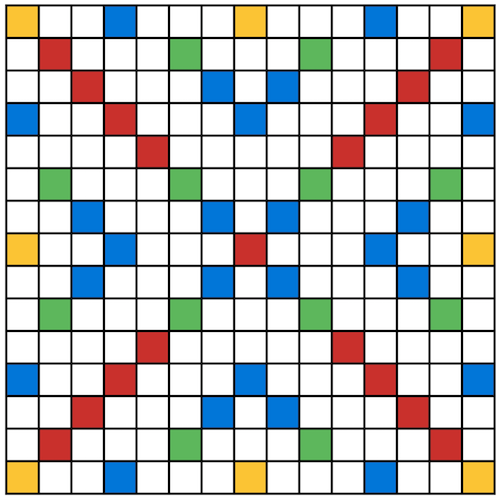
For the client side of the application I created a React App and installed Redux to manage the state. I started with creating a Board component — a table that contains multiple instances of Row component, which in their turn consist of 15 Square components. When iterating through board’s array of rows, Board component assigns y coordinates to each Row component, which then iterates through each item inside it’s array to assign x coordinates. So each Square component in the end ends up having x and y coordinates that can later be assigned to the Tile component dropped on top of it. When rendered on page, the full Board looks like this:
I created a second table holding 7 Square elements inside of it to represent the player’s rack. It also has coordinates, but they are different from board’s coordinates, so that tiles can be moved back and forth between the board and rack without creating a mixup in their “address”. A user’s full rack looks like this:

The next and probably one of the trickiest steps I took from here was configuring React Drag and Drop to allow user to conveniently move tiles from the rack to the board and all around the board. In order to achieve that I used React DnD library created by the inventor of Redux Dan Abramov. There is a helpful chess app tutorial that I recommend coding along with if you are looking to implement Drag and Drop for your app. It explains basic concepts of Drag Source and Drop Target, available Monitor functions, such as didDrop() and canDrop() that are designed to fully customise drag and drop mechanism of your app. For instance, in my case the canDrop() condition for tiles was to not be able to stack on top of other tiles, and canDrag() depended on the whether the “draggable” prop of the component is true or false. It took some trial and error to get this feature to work the way I wanted it to, but the result was definitely worth it!
As a result of a drop action the Tile component that used to have x and y props corresponding to rack squares coordinates now receives new x and y props corresponding to the coordinates of the square on board.
Making React App and Rails API talk to each other
In order to make it happen a simple CORS configuration had to take place, the file can be reached inside config/initializers folder of the Rails App. This helps establish connection with your Client App. As for the React App, the address at which the API can be accessed is set inside .env file for easy access by actions. Following Redux documentation I created several reducers and actions to handle sending and receiving data from the API, and then setting the state of app’s components.
JWT Authentication
I thought it would be neat if users could be able to save their games and come back to them to continue playing at any time, so I decided to implement Authentication. That also turned out to be slightly more complicated that expected. It seemed like there is a lot of ambiguity about how to approach this task and not really a single fail-proof solution to this problem. I decided to go with JWT authentication, which is not considered to be the most secure, but in my case no sensitive personal user information is going to be stored in the database (just any imaginary username and hashed password), so it serves its purpose of just allowing user to save games and connect with other users to play together.
Implementing JWT authentication on the Rails side included creating a custom Auth library that is able to generate a token and then later decode it to authenticate the user. I also created an Auth controller containing login and refresh actions.
Handling authentication on the client side required creating a separate session reducer and a set of necessary session actions to handle login, signup, page refresh and log out scenarios.
Scoring algorithm
The first step in calculating points earned was to define if the main played word is positioned horizontally or vertically by placing all played tiles in a sorted played_tiles array, and analysing their x and y coordinates. Next, set word_multiplier to a value larger than 1 if any of the tiles are positioned on the square with an x2 or x3 word multiplier (red or orange squares). Next I chose first tile out of the played_tiles array and created two loops to iterate up and down for vertical word, or left and right for horizontal one to collect all tiles constituting the word, and then check them against played_tiles array to then see if any x2 or x3 letter multipliers (blue or green squares) should be applied.
After calculating the score for the main word, I iterated through played_tiles array and checked each tile for adjacent ones in the direction opposite to the main word. So if let’s say the main word was vertical i’d check if each tile it contains formed horizontal words by iterating through adjacent board squares to the left and right of it. And, again, if necessary during this process I applied letter and word multipliers to those additional formed words.
The Game
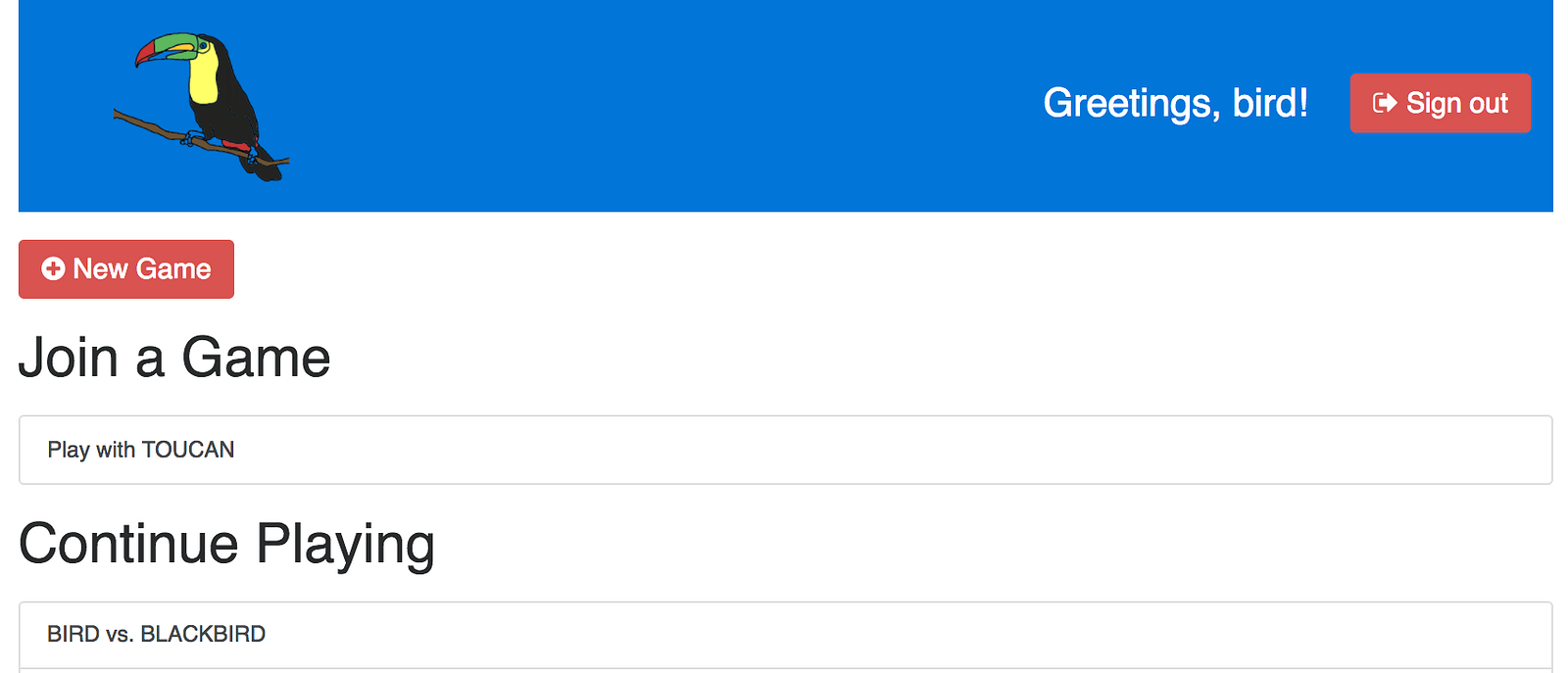
Now that users were able to sign up and log in into the application, I have created a sort of a dashboard where all the available games started by other users are displayed, along with the user’s games in progress.
As for the Game page I added several important buttons: “WORD” — to submit the word and take turn, “Skip Turn”, and “Exchange Tiles”. These buttons have onClick event handlers that fire request to the backend and have corresponding routes and actions processed by the Game Controller in Rails. “WORD” button comes with a condition for being able to submit your move: you have to obviously wait for your opponent to take their turn before you can go again.
As mentioned previously my Turn model on the backend side of the application stores information about formed word(s) and points scored after each turn. This allowed me to create GameLog component to be rendered on Game’s page — a collapsable element, that shows game history.
Here is what final version of Game page looks like:

As of now, the game has the following functionality:
- User can sign up/sign in.
- User can create a game.
- User can see and join an existing game.
- Users can take turns, submitting their words, or exchanging tiles if they please.
- Users can win games and lose games.
- Users can play unlimited amount of games with their friends and strangers!
In conclusion, I’d like to list some of the major improvements that I’m planning to implement in future:\
Add Action Cable, so that pages refresh automatically and all users are subscribed to changes in the game, because after all hitting refresh button 100 times waiting for something to change sounds like something from 10 years ago. Add more rules/restrictions to the game, as right now it is mostly based on “trust”. Check every created word against the dictionary, allow the first turn only if the word is formed in the centre of the board, make turns valid only if the tiles connect to existing ones on the board.
